
Most enterprise IT teams aren't starting fresh. You already have Microsoft 365 licenses, a Cisco infrastructure investment, or both. Teams Phone has just over 26 million active users. Webex Calling sits at around 16 million. Zoom Phone trails at roughly 8 million. In many large organizations, Teams and Webex are already running in parallel.
This guide covers the practical differences in calling, AI features, security, and licensing costs.
Your existing stack matters more than features
Microsoft Teams is part of Microsoft 365. Organizations running Outlook, SharePoint, OneDrive, and Azure Active Directory can manage Teams from the same admin center, with no separate authentication and compliance tools that already apply to the rest of the Microsoft 365 environment.
Cisco Webex is built around telephony. It performs well in environments where calling reliability and device integration take priority. Organizations with Cisco room systems, desk phones, and meeting boards get tighter hardware integration with Webex than with any other platform.
Webex integrates with Microsoft 365, and Teams works with a range of third-party calling providers. But your starting point determines how much additional configuration your IT team needs to absorb.
Calling and Telephony
Microsoft Teams Phone
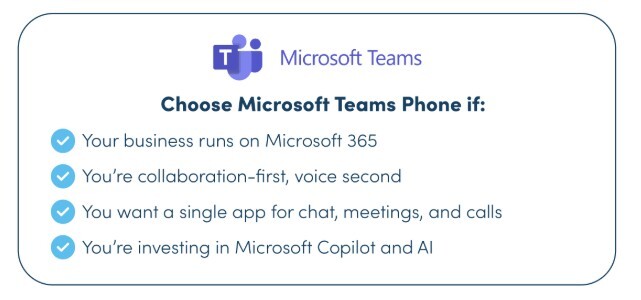
Teams Phone works well for users already in Microsoft 365. Calling, meetings, chat, and documents run through the same environment.
Key facts for IT planning:
-
Voice calling supported in approximately 181 countries
-
Included in Microsoft 365 E5 at no additional platform cost
-
Calling Plans, Operator Connect licenses, Teams Premium, and Copilot are each separately licensed
-
Phone calling adds roughly $8–12 per user per month on top of the base subscription
Cisco Webex Calling
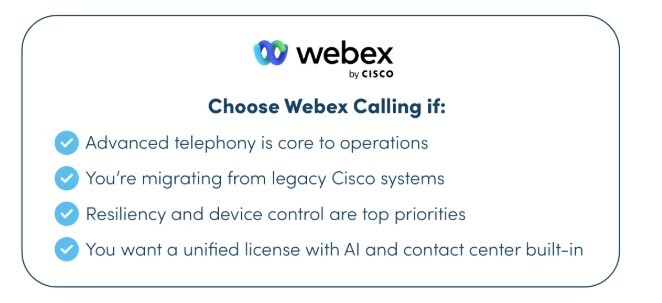
Webex Calling performs well in industries where voice is the primary workload. Cisco produces its own desk phones, room systems, and meeting boards, all of which run natively on the platform.
Key facts for IT planning:
-
Strong fit for healthcare, manufacturing, logistics, and financial services
-
First-party hardware portfolio covers desk phones, room systems, and meeting boards
-
Cisco is actively migrating on-premises telephony customers to cloud deployments
-
Licensing is tied to voice use cases and is not bundled with a broader productivity suite
Running both
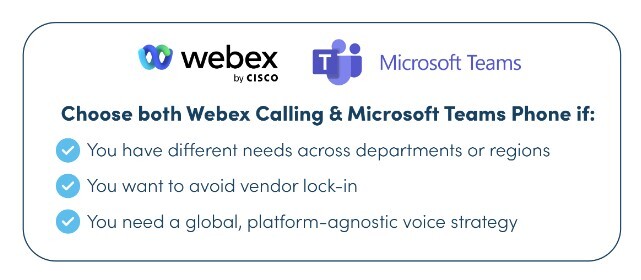
Many enterprises run both platforms, usually because acquisitions or regional differences make full consolidation impractical. Common patterns include:
-
Finance teams on Microsoft 365 E5 running Teams Phone
-
Contact center and manufacturing teams staying on Webex Calling
-
Regional business units on different platforms following acquisitions
IT teams managing this split are increasingly planning for long-term coexistence rather than a single-platform endpoint.
AI features
Microsoft Copilot in Teams
Copilot works across Microsoft 365: meetings, calls, documents, email, and Excel. In Teams, it transcribes meetings, generates summaries with action items, and drafts follow-up messages.
Copilot is not included in standard Microsoft 365 licenses. Teams Premium costs $10 per user per month. A full Copilot license adds more.
Organizations that use Copilot across the wider Microsoft 365 stack may find the cost easier to justify than those who want it only for meetings.
Cisco AI Assistant for Webex
Webex's AI Assistant is included in paid plans. It transcribes meetings, generates summaries, produces action items, and supports voice commands. In contact center environments, it provides agent assistance, real-time conversation support, and automated summaries for dropped calls.
The AI Assistant does not extend into document creation, spreadsheets, or email. Cisco's AI investment is focused on voice and meetings.
For organizations whose main requirement is more productive calls and meetings, the included AI features cover most of that ground.
Security and compliance
Both platforms support enterprise security requirements. The differences are in how compliance tools are accessed and managed.
Teams' compliance tools sit inside the Microsoft 365 Compliance Center alongside the rest of your Microsoft 365 data: eDiscovery, legal hold, data loss prevention, retention policies, audit logs, and information barriers are all in one place.
For regulated organizations already using Microsoft's compliance infrastructure, this reduces administrative overhead.
Webex provides end-to-end encryption, FedRAMP-authorized security at enterprise tier, and compliance features including eDiscovery and legal hold through Cisco's Cloudlock and Stealthwatch platforms. Cisco also supports on-premises deployment for organizations with data residency requirements.
Webex is widely used by government agencies, regulated healthcare providers, and multinationals with strict data sovereignty obligations.
Licensing and total cost of ownership
Teams is bundled into Microsoft 365 Business and Enterprise plans. For organizations already on E3 or E5, adding Teams calling is an incremental cost. Standalone telephony or advanced AI features require additional licenses that add up at scale.
Webex pricing is modular. Paid plans for meetings start around $14–18 per user per month. The Webex Suite, which includes calling, runs around $25–30. Enterprise plans carry custom pricing and include FedRAMP security, meetings for up to 1,000 participants, and dedicated support. The AI Assistant is included at all paid tiers.
Organizations already paying for Microsoft 365 E3 or E5 that also run Webex will pay for overlapping capabilities. For organizations managing telephony separately from their productivity tools, or running multi-platform environments, Webex's licensing structure tends to be cleaner.
Hardware and room systems
Cisco produces its own room systems, Webex Boards, desk phones, and meeting devices. These are first-party products that run natively on Webex. Cisco hardware now also supports Teams and Zoom, so organizations with Cisco room systems are not restricted to Webex software.
Microsoft Teams Rooms works with hardware from Logitech, Poly, Yealink, Crestron, HP, and Lenovo, across room sizes and price points. IT teams standardizing conference room infrastructure have more hardware options with Teams Rooms than with Webex.
Deciding between them
Teams is the stronger fit when your organization is already on Microsoft 365 and you want calling, collaboration, and AI tools to run in the same environment. It suits knowledge workers in finance, professional services, and the public sector, and gives IT more flexibility on meeting room hardware.
Webex is the stronger fit when calling reliability and device integration are the primary requirements, particularly in healthcare, manufacturing, logistics, or environments with FedRAMP or data residency obligations. Organizations with a large Cisco hardware estate will get better native integration with Webex.
Running both makes operational sense when acquisitions, regional differences, or department-level requirements mean that consolidation onto a single platform would create more problems than it solves.
Managing voice across both platforms
For most large enterprises, the harder task is not choosing between Teams and Webex but managing telephony across both, across multiple regions.
Pure IP supports Microsoft Teams Phone and Webex Calling through certified Operator Connect, Direct Routing, and Cloud Connect services. We work with organizations migrating from Cisco Call Manager, scaling Teams Phone globally, and managing environments that run both platforms.
Talk to our team about building a voice strategy that works across Teams and Webex.