
Most enterprises choose their Teams Phone carrier before they assess their WAN. That sequence is where call quality problems start. Not in the carrier network, and not in Teams itself.
Teams Phone call quality degrades when SD-WAN is deployed without QoS policies configured for real-time voice traffic. SD-WAN treats all application traffic equally unless instructed otherwise. Without voice prioritization, Teams calls compete with file transfers and general internet traffic during peak usage. The result is jitter and packet loss that the MOS score reflects and users hear.
The decision to migrate to Teams Phone involves two separate infrastructure layers. The first is the carrier providing PSTN connectivity. The second is the WAN carrying voice traffic across enterprise sites. Most organizations evaluate these on different timelines, with different teams, against different criteria. By the time call quality problems surface, both vendors are live. Neither can see far enough into the other's environment to isolate root cause.
The sequence most enterprises get wrong
Teams Phone evaluations typically start with carrier selection. IT teams compare Operator Connect providers on coverage, pricing, and SLA terms. Direct Routing evaluations focus on Session Border Controller configuration and provider certifications.
The WAN is assessed separately. Network Operations is looking at bandwidth, site count, and cost reduction. They are not asking whether the current SD-WAN topology will degrade Teams call quality once the migration goes live.
A WAN readiness assessment covers four things: topology, transport quality, QoS configuration, and the ability to route Teams traffic directly to Microsoft's network edge. It should happen before a carrier contract is signed. Most enterprises run it after, if they run it at all.
Why the WAN is where Teams call quality is decided
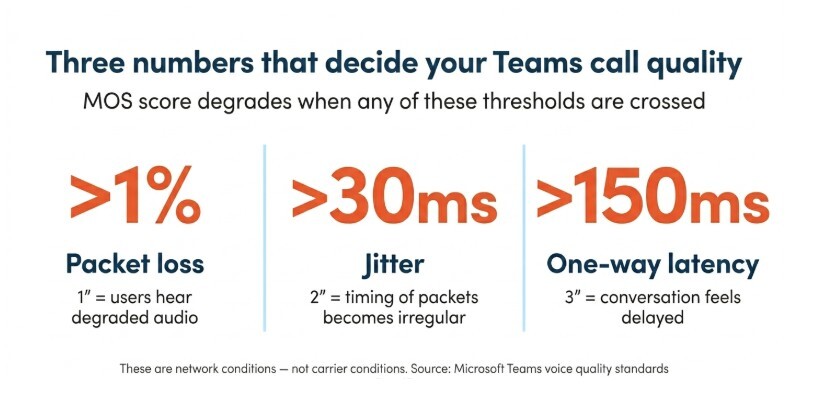
Mean Opinion Score, or MOS, measures perceived voice quality on a scale from 1 to 5. It degrades when packet loss exceeds 1%, when jitter climbs above 30ms, or when one-way latency passes 150ms. These are network conditions, not carrier conditions.
A Teams call passes through the enterprise WAN before it reaches the carrier network or Microsoft's infrastructure. If the WAN introduces latency, jitter, or packet loss, call quality is already compromised before the carrier sees the traffic.
SD-WAN addresses this, but only when it is configured for it. Application-aware routing steers voice traffic to the lowest-latency path, separate from general internet traffic. Without that configuration, a Teams call gets the same treatment as a SharePoint file download. During peak usage, that matters.
Hub-and-spoke architecture and why it hurts voice
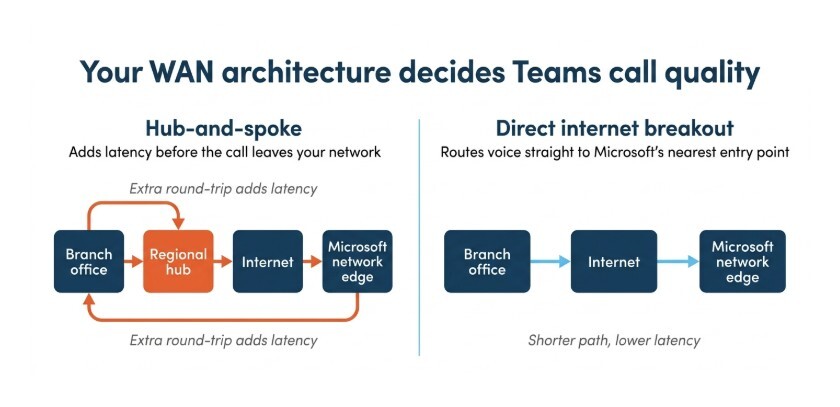
A hub-and-spoke SD-WAN routes branch traffic to a central data center before breaking out to the internet. That architecture works for email and file access. For real-time voice, it adds a round-trip the call cannot absorb.
Each extra hop adds latency. For a branch office routing Teams calls through a regional hub, traffic must reach the hub before breaking out to Microsoft's network edge. That round-trip can push one-way latency past the point where users notice. The call sounds fine on the dashboard. It sounds bad on the phone.
Direct internet breakout to Microsoft's network edge
Direct internet breakout routes Teams traffic from each branch directly to Microsoft's nearest network entry point, bypassing the hub entirely. Latency drops. Call quality follows.
Microsoft publishes connectivity principles for Microsoft 365, including guidance on local internet egress for real-time applications like Teams Phone System. SD-WAN platforms with Microsoft 365 optimization can implement this automatically. The WAN needs to be built for it, or reconfigured to support it, before Microsoft Teams Phone goes live.
QoS that's configured for real-time traffic
Quality of Service policies tell the SD-WAN which traffic gets priority on the best-performing path. Voice and video traffic should take the lowest-latency route, with headroom reserved for packet delivery.
Many SD-WAN deployments ship with QoS configured for generic business traffic. Real-time voice requires a QoS policy that identifies Teams media traffic and routes it accordingly. Microsoft's guidance on implementing QoS for Teams covers DSCP marking and port ranges for media traffic. Without that configuration, the SD-WAN delivers general connectivity improvement, not voice-specific improvement. The user experience on Teams Calling reflects the difference.
Full guide to managed SD-WAN architecture and design here.
Who's responsible when a Teams call degrades?
The carrier can see the PSTN leg. Microsoft's Teams Admin Center shows call quality data from the platform side. The SD-WAN vendor can see the enterprise WAN. When a call degrades somewhere in the middle, each vendor is reviewing a different section of the path.
The carrier checks their network and finds no issue. Microsoft shows call quality data from the application boundary. The SD-WAN dashboard shows the WAN performing within spec. No one is looking at the intersection, and the call quality is still poor.
This is not down to the technology – it’s a question of vendor boundaries. When voice infrastructure and network infrastructure belong to different providers, fault isolation requires coordination that no SLA guarantees. Each vendor owns a section of the path but nobody owns the intersection.
The same dynamic plays out in managed SD-WAN engagements more broadly when Managed SD-WAN doesn’t cover the full underlay, the accountability gap follows the same fault lines.
What to ask before you sign a carrier contract
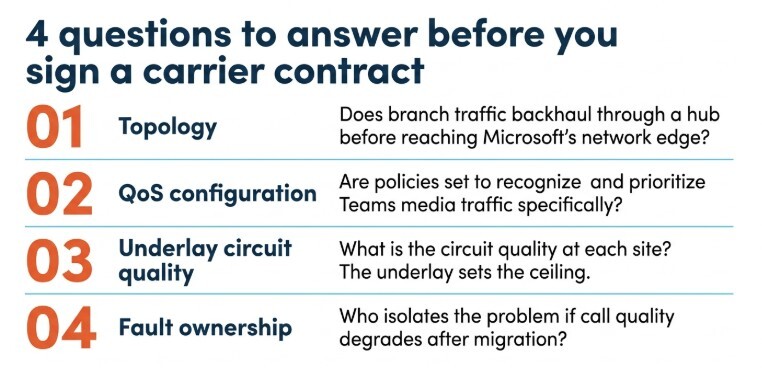
Before selecting an Operator Connect provider or configuring Direct Routing, four questions need answers from the WAN side.
- Does the current topology backhaul branch traffic through a hub before it reaches Microsoft's network edge? If so, that architecture needs to change. The carrier's SLA will not compensate for a WAN that adds latency before the call leaves the building.
- Are QoS policies configured to recognize and prioritize Teams media traffic specifically? Application-aware routing on an unconfigured SD-WAN is not voice optimization.
- What is the underlay circuit quality at each site? A capable SD-WAN platform running over a poor-quality circuit delivers poor voice quality. The underlay sets the ceiling.
- Who owns fault isolation if call quality degrades after migration? If the answer requires coordinating your carrier, your SD-WAN vendor, and your network team, the structure does not work. Enterprise voice needs clearer ownership than that.
Pure IP manages both the voice infrastructure and the enterprise WAN for its customers. When a Teams call degrades, there is one call to make. Our engineers see the full path: from the PSTN handoff through the carrier network, across the WAN, to the endpoint. Fault isolation does not stop at a vendor boundary, because there is no boundary to stop at.
If you are planning a Microsoft Teams Phone migration, talk to us about WAN readiness before you finalize your carrier.
Frequently asked questions
Does SD-WAN automatically improve Teams Phone call quality?
No. SD-WAN improves Microsoft Teams call quality only when QoS policies prioritize real-time voice traffic and the WAN topology routes Teams media directly to Microsoft's network edge. Without those configurations, SD-WAN delivers general connectivity improvements. Teams Calling performance requires voice-specific design, not a general network upgrade.
Who should manage SD-WAN if we're also migrating to Teams Phone?
The provider managing your WAN should have direct visibility into how network conditions affect your voice platform. If WAN and voice infrastructure are managed by separate vendors, neither has a full view of the call path. A single provider managing both removes the fault isolation gap that split-vendor environments create.
What's the difference between WAN readiness and network readiness for Teams?
Microsoft's network readiness assessment covers bandwidth, firewall configuration, and port availability — the technical prerequisites for Teams to function. WAN readiness goes further. It covers topology, QoS configuration for voice traffic, circuit quality at each site, and the accountability structure across providers. Microsoft's published guidance does not address the vendor boundary problem.

.png?width=405&height=200&name=Cloud-based%20phone%20systems%20for%20large%20businesses%2c%20explained%20(1).png)