
The Teams migration went live on Monday. By Tuesday afternoon, the helpdesk had twelve tickets. Robotic audio. Dropped syllables. Calls cutting out mid-sentence on sites that tested clean during UAT.
The Teams admin pulled the Call Quality Dashboard. All metrics were within range. The carrier confirmed the circuits were within SLA. The platform was healthy. The calls were not.
Most Teams Phone migrations often fail on voice quality for the same reason: the network layer was never in scope.
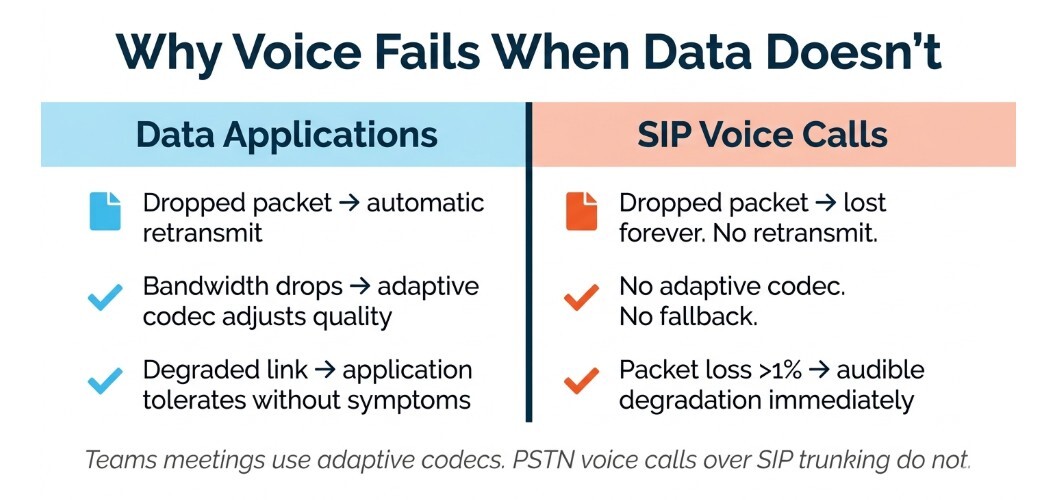
PSTN voice calls over SIP trunking have no error-correction buffer. Packet loss, jitter, and WAN brownout conditions that data applications tolerate without symptoms cause dropped syllables and audio degradation on live calls. The Teams Call Quality Dashboard cannot see the carrier or WAN layer.
What Teams Phone migration guides cover
The core decisions in a Microsoft Teams Phone migration are well documented. Operator Connect or Direct Routing — the connectivity model that determines how Teams Phone reaches the PSTN. Licensing. Number porting. Dial plan configuration, which is where most projects spend the most time.
These are the right decisions. They are also not the full picture.
Operator Connect and Direct Routing specify how the PSTN connection is established. Neither specifies what the WAN must deliver to keep that connection stable under real enterprise load. That conversation belongs to the network team. On most migration projects, it does not happen until something breaks.
For a complete walkthrough of the Operator Connect migration process - number porting, user provisioning, the Teams Admin Center flow - this guide covers the platform side in full. The network side is what this piece addresses.
What they leave out
Voice traffic has different network requirements than Teams meetings or data applications.
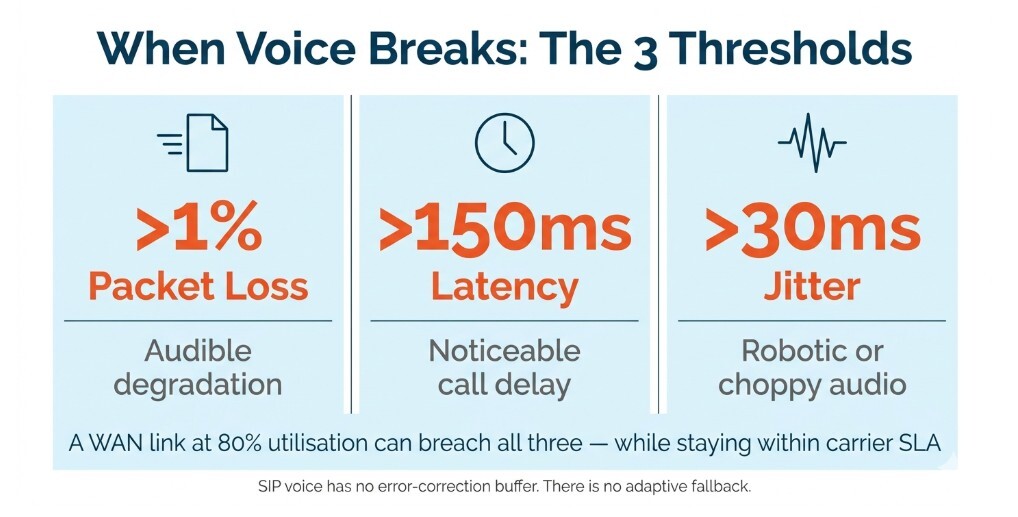
A Teams video meeting uses adaptive codecs that adjust quality to available bandwidth. A dropped packet in a data transfer triggers a retransmit. PSTN voice calls over SIP trunking do neither. There is no buffer, no adaptive fallback. Packet loss above 1% produces audible degradation. Latency above 150ms produces noticeable delay. Jitter above 30ms produces robotic or choppy audio.
These thresholds are not aggressive. A WAN link running at 80% utilization during peak hours can produce all three, while remaining technically within SLA from the carrier's perspective and showing no symptoms in data applications. Our breakdown of 7 essentials for top-notch calling quality in Microsoft Teams covers the full set of network and configuration factors that affect voice quality post-migration.
The network question for a Teams Phone migration is not "do we have connectivity?" It is "what does this WAN deliver to voice traffic at peak load, across every site, with the failover paths we actually have?"
Why voice fails when the network wasn't in scope
The brownout scenario is where most post-cutover problems originate.
A brownout is a link that is up but degraded. Packet loss is elevated. Latency spikes intermittently. The SD-WAN platform may have already steered traffic to a secondary path, which may itself be under load. The carrier considers the primary circuit operational. The Teams Call Quality Dashboard reports within its visibility boundary, which ends at the platform edge.
The CQD does not see the carrier layer. It does not see the WAN. It cannot correlate a latency spike at a specific site with a circuit degradation event at the carrier level. That correlation requires pulling data from three separate tools, the platform, the PSTN carrier, the network monitoring stack, across three separate vendor relationships.
By the time that data is assembled, the incident has passed. The tickets accumulate. The root cause stays unclear. The fix applied is usually a QoS policy change inside Teams, which addresses the symptom without touching the cause.
This vendor boundary problem extends beyond the migration itself. It is the same gap that makes Managed SD-WAN’s underlay responsibilities worth understanding before selecting a provider.
When in a migration project should the network conversation happen?
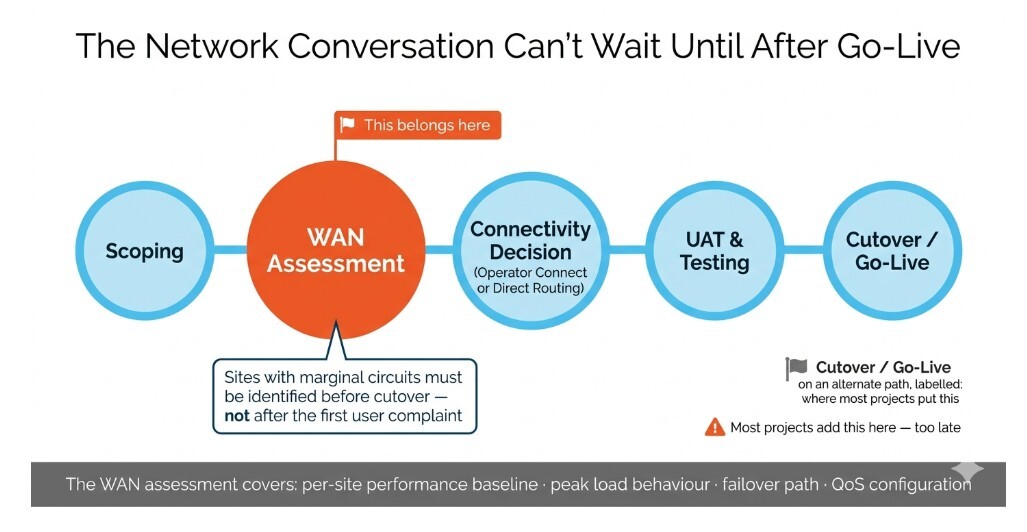
Before go-live. Specifically, at the scoping stage, before the Operator Connect or Direct Routing decision is finalized.
The connectivity model determines how the PSTN reaches Teams Phone. The WAN assessment determines whether the network between users and that connection can reliably carry voice traffic under real conditions. Both decisions belong in the same planning conversation.
A WAN assessment for a Teams Phone migration covers the performance baseline per site, the behavior of each link under peak load, the failover path and how quickly it activates, and whether QoS policies are configured to prioritize voice traffic ahead of data. Sites with marginal primary circuits need that identified before cutover, not after the first user complaint.
Does Teams Phone require SD-WAN? No. But it does require a network that can consistently deliver sub-150ms latency and sub-1% packet loss to the PSTN connection point. Whether that comes from managed SD-WAN, a well-configured MPLS network, or a combination depends on the site. The assessment tells you which sites need attention before day one.
Microsoft's own network readiness guidance for Teams covers bandwidth, firewall configuration, and port availability. A WAN assessment for voice goes beyond that — it covers topology, per-site circuit quality, and the accountability structure across providers once the migration is live.
What a network-inclusive migration looks like
Pure IP provides PSTN connectivity for Microsoft Teams Phone through Operator Connect and Direct Routing, alongside managed network infrastructure. The network assessment is part of the migration engagement, not a separate workstream handed off to a different vendor.
Customers have direct access to Pure IP engineers throughout deployment. When voice quality issues surface during testing, the same team that configured the SIP trunking can trace the path to the WAN and back. There is no gap between the platform team and the network team because there is one team.
The difference between a migration that delivers clean voice on day one and one that spends the first month firefighting tickets is usually not the platform configuration. It is whether the network was in scope before the cutover.
Frequently asked questions
Does Teams Phone require SD-WAN?
Teams Phone does not require SD-WAN. It requires a WAN that can deliver consistent voice performance: latency under 150ms, packet loss under 1%, and jitter under 30ms to the PSTN connection point. How a network achieves that depends on the site and existing infrastructure. SD-WAN is one way to get there; a properly configured MPLS network is another.
What does the Teams Call Quality Dashboard not show?
The CQD reports on call quality metrics at the platform boundary. It does not see the PSTN carrier layer, the WAN between the site and the PSTN connection point, or the network conditions that produced the metrics it reports. Correlating a CQD alert to a specific carrier or WAN event requires separate tooling and separate vendor conversations.
When should network assessment happen in a Teams Phone migration?
At the scoping stage, before the connectivity model is finalized. Microsoft's network readiness guidance covers the platform prerequisites. A WAN assessment goes further — it identifies sites with marginal performance before go-live, when the fix is a configuration change rather than an emergency ticket. Running the assessment post-cutover is possible but more expensive, operationally and reputationally.

.png?width=405&height=200&name=Cloud-based%20phone%20systems%20for%20large%20businesses%2c%20explained%20(1).png)